
Whiteboard Explainer Video Company for Education: Choosing the Right Partner
A top-tier whiteboard explainer video company for education does more than just animate; it blends deep pedagogical insight with compelling creative storytelling. The goal is to make even the most complex subjects feel simple and engaging. They become strategic partners, helping you turn curriculum objectives into visual narratives that genuinely improve how well students retain and understand information.
Why Whiteboard Videos Are Essential for Modern Learning
Let's face it: grabbing and holding a student's attention is a real challenge these days. With countless digital distractions, traditional teaching methods often can't keep up. This is precisely where whiteboard animation comes in—not as a fleeting trend, but as a seriously effective teaching tool.
The real magic of the format is its ability to break down complex ideas. The hand-drawn, step-by-step reveal naturally guides the viewer's focus, making abstract or tricky subjects suddenly feel manageable. It shifts the experience from passive viewing to an active learning journey.
Simplifying the Complex
Think about a tough topic, like cellular respiration in a biology class or grappling with algebraic equations. A static diagram in a textbook can feel overwhelming. A whiteboard video, on the other hand, builds the concept layer by layer, carefully synchronising the voice-over with the visuals to lock in each idea before introducing the next.
This methodical build-up is fantastic for preventing cognitive overload. It helps learners construct a solid mental map of the subject matter. A truly great video even anticipates where a student might get stuck, using visual clarity to clear up potential confusion before it starts. For a closer look at structuring these lessons, resources on making tutorial videos offer some excellent instructional design tips.
Boosting Engagement and Retention
There’s something inherently captivating about whiteboard animation. The constant motion of the drawing hand creates a natural sense of curiosity, making students lean in to see what's coming next. This kind of visual storytelling is a lifeline for learners who struggle to connect with dense, text-heavy materials.
For educational institutions and EdTech firms, choosing the right creative partner isn’t just a vendor purchase; it’s a strategic move that directly impacts learning outcomes. The goal is to create content that not only teaches but inspires curiosity.
The results speak for themselves. In Poland's rapidly growing EdTech sector, which was valued at PLN 1.2 billion in 2023, whiteboard animations are proving to be a game-changer. These dynamic visuals can boost knowledge retention by up to 30%. With 70% of Polish teachers now using digital content in their classrooms, this format is perfectly suited for clarifying complex STEM concepts.
This guide is designed to help you make that choice with confidence, ensuring your investment in educational animation leads to real, measurable improvements in learning.
How to Assess a Company’s Grasp of Pedagogy
A beautifully animated video is useless if it doesn't actually teach anything. This is the moment where you separate a genuine whiteboard explainer video company for education from a standard video production house. You're not just looking for a motion graphics artist; you need a partner who gets learning design.
Your first stop is their portfolio, but you need to look deeper than just slick animations. Put on your "learner" hat. Does the information unfold in a logical way? Can you pinpoint the learning objectives being addressed in their video samples?
A truly great educational video doesn’t just throw facts at the viewer. It builds knowledge, piece by piece. This idea, called scaffolding, is a dead giveaway that a company understands pedagogy. Look for examples where complex topics are broken down and introduced sequentially, with each new concept building on the last.
Looking for Learning Design in Action
As you review a company's past work, ask yourself a few pointed questions to really test their educational chops:
- Pacing and Cognitive Load: Do they race through difficult points, or do they give you a moment to breathe and process the information? A well-designed video is mindful of the viewer's cognitive load, making sure not to overwhelm them with too much information too quickly.
- Visual Reinforcement: Are the drawings on screen just for show, or do they actively support what the narrator is saying? In a strong pedagogical design, the visuals and the audio are a team, working together to lock in understanding.
- Audience Appropriateness: If a video is meant for primary school kids, do the language and visuals feel right for that age? On the other hand, is a video for university physics students sophisticated enough?
Paying attention to these details tells you if a company is just animating a script someone handed them, or if they are actively thinking about how people learn. This becomes absolutely crucial for specialised content like professional development or compliance. In fact, many of the core ideas behind effective training animation are directly applicable to any educational video.
The most effective educational videos are born from a collaboration between creative storytellers and subject matter experts. Your potential partner’s process should not just accommodate this collaboration; it should depend on it.
Asking the Right Questions
After you've seen their work, it’s time to talk about their process. The answers you get here are often the most revealing part of the whole evaluation. Don’t be shy about digging for specifics and pushing past a simple "yes, we do that."
Here are a few essential questions to bring to the table:
- How do you collaborate with Subject Matter Experts (SMEs)? Have them walk you through their process. Who on their team actually talks to the expert? At what specific points—scripting, storyboarding, animation—is the SME's feedback formally gathered and integrated?
- What's your approach to curriculum alignment? If you give them a set of learning standards or curriculum points, how exactly do they make sure the final video ticks all those boxes?
- How do you build in accessibility from the start? Real accessibility isn't something you tack on at the end. Ask about their experience with WCAG (Web Content Accessibility Guidelines). This includes providing accurate closed captions, full transcripts, and even descriptive audio tracks. A company that knows its stuff builds these things into the workflow from day one.
A team that can answer these questions confidently, with real examples from past projects, is a team that takes pedagogy seriously. They don't just see themselves as animators; they see themselves as your partners in achieving real learning outcomes.
Navigating the Creative Process from Brief to Final Cut
Once you’ve found a partner with the right pedagogical chops, the real fun begins. This is the creative journey where your idea starts to take shape, evolving from an abstract concept into a tangible, powerful learning tool. To get the result you’re picturing, you need to be an active, informed collaborator every step of the way.
The entire project really hinges on one thing: a solid creative brief. Don't think of it as a formality. It’s the foundational document that guides every single decision, from the very first script draft to the final animated cut. From my experience, a vague or flimsy brief is the number one reason for misaligned expectations and costly, time-consuming revisions later on.
Crafting a Powerful Creative Brief
Your brief is your chance to translate your educational goals into a clear, concise creative roadmap for the production team. It’s less about giving strict instructions and more about building a shared understanding of what this video needs to achieve.
To make sure nothing gets lost in translation, your brief needs to nail down a few core questions:
- The Main Takeaway: What is the single most important thing a student must know or be able to do after watching? Be specific.
- Your Audience: Who are you talking to? "K-12 students" is too broad. Are they tenth-graders wrestling with chemistry concepts or seventh-graders who need a clear historical timeline? What do they already know?
- Key Talking Points: What are the 3-5 absolutely essential concepts the video has to cover to hit that main learning objective?
- Tone and Voice: How should it feel? Authoritative and expert, or friendly and conversational? Is the goal to inspire, to be serious, or maybe even a little humorous?
- Mandatory Inclusions: Are there any non-negotiables? Think specific terminology, brand colours, or logos that absolutely must be in the final video.
Getting these details down on paper right from the start stops the creative team from guessing. It ensures their first drafts are already pointing in the right direction, saving everyone time and frustration.
This little flowchart shows how all the upfront assessment work feeds directly into creating a strong brief.
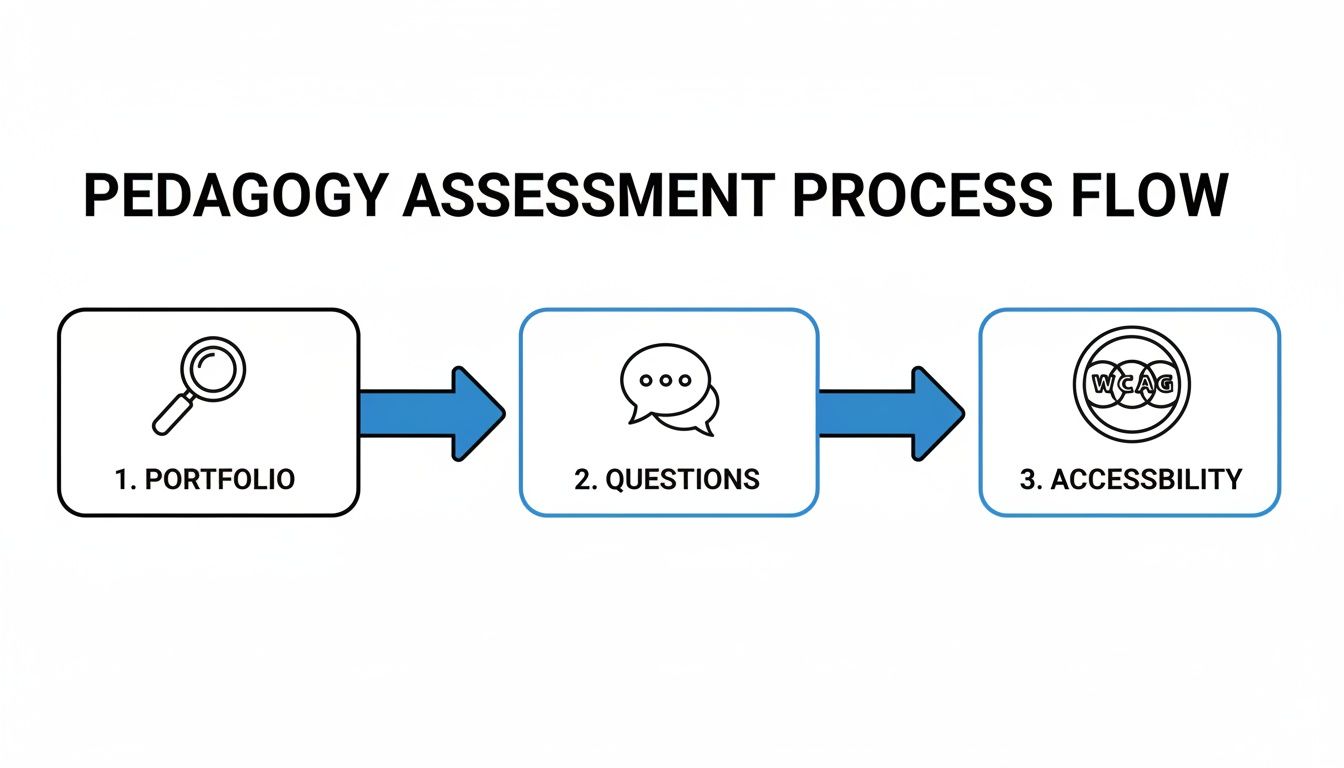
As you can see, checking their portfolio, asking the right questions, and confirming their accessibility approach all give you the insights needed to write a brief that truly sets the project up for success.
A well-structured brief is the cornerstone of a successful educational video project. The table below outlines the essential components to include, helping you frame your thoughts and provide the production company with a crystal-clear vision.
| Component | Key Questions to Answer |
|---|---|
| Project Overview | What is the video's title? Briefly describe the project's purpose and scope. |
| Learning Objectives | What specific knowledge or skills should the learner gain? List 1-3 measurable outcomes. |
| Target Audience | Who are the learners? Describe their age, grade level, prior knowledge, and learning context. |
| Core Message | What is the single most important idea you want to communicate? |
| Key Concepts | What are the 3-5 essential topics or steps that need to be explained? |
| Tone & Voice | What is the desired mood (e.g., encouraging, serious, playful)? Who is the narrator (e.g., expert, peer)? |
| Visual Style | Are there any specific visual elements, brand guidelines, or colours to incorporate? |
| Call to Action | What should the learner do next? (e.g., complete a quiz, visit a website, discuss with a teacher). |
| Mandatories & Restrictions | What elements absolutely must be included or avoided (e.g., logos, specific terminology, disclaimers)? |
By thoughtfully completing each section of this checklist, you provide the creative team with everything they need to bring your educational vision to life effectively and efficiently.
Reviewing Scripts and Storyboards
Once the brief is locked in, the whiteboard explainer video company for education you've hired will get to work on the script. When that first draft lands in your inbox, do one simple thing: read it out loud. It’s a fantastic trick for catching clunky sentences and checking if the pacing feels right. You also need to make sure the language is perfectly pitched for your learners—no confusing jargon allowed.
Next up is the storyboard. This is a critical checkpoint where the words meet the pictures. A storyboard is basically a comic-book version of your video, showing each scene with notes on the visuals and narration. Your job is to make sure the visuals actually reinforce the lesson, not just decorate the screen.
A classic mistake I see is approving a storyboard where the images are merely illustrative instead of truly explanatory. For instance, if the script says "photosynthesis," a weak storyboard might just show a picture of a leaf. A great one will show the step-by-step process of how it works.
Look at each panel and ask yourself: does this drawing clarify what the narrator is saying? If you're explaining something complex, do the visuals break it down into a logical, easy-to-follow sequence?
Giving sharp, constructive feedback here is so much more effective than asking for massive changes after the animation is already underway. This kind of proactive teamwork is what ensures the final video doesn't just look good, but actually achieves your educational goals.
Making Sense of Pricing Models and Deliverables
Trying to compare quotes from different video companies can feel like comparing apples and oranges. One agency might quote a per-minute rate, another a flat project fee, and a third could send over a tiered menu of options. Let's cut through the confusion so you can make a smart, informed investment in your educational content.
You'll mostly see two models: per-minute pricing and project-based fees. On the surface, per-minute rates look simple. But they can be seriously misleading for educational videos, where it's the complexity, not just the length, that really drives the workload. A 60-second video breaking down quantum physics is going to demand a whole lot more brainpower and development time than a 60-second clip on basic addition.
This is why project-based fees are often a much better fit for educational content. This approach gives you a single, all-in price for the entire production, from the first script draft to the final files. It also fosters a more collaborative partnership because the focus shifts from just hitting a specific runtime to genuinely achieving the learning objective.
Understanding What Your Budget Buys
It's absolutely vital to grasp how different budget tiers affect the final video. A smaller budget might mean simpler, icon-driven illustrations and less fluid animation, which can still be perfectly effective for straightforward concepts. As your investment increases, you unlock access to more detailed, custom artwork, sophisticated character animation, and a much richer sound design.
To make this more concrete, here’s a quick look at what different investment levels might get you:
| Budget Tier | Illustration Style | Animation Complexity |
|---|---|---|
| Entry-Level | Simpler, icon-based graphics with limited customisation. | Basic motion graphics, text reveals, and simple transitions. |
| Mid-Range | Custom-designed characters and scenes aligned with your brand. | More fluid character movements, dynamic scene transitions, and synchronised effects. |
| Premium | Highly detailed, bespoke artwork with intricate backgrounds and textures. | Complex character acting, seamless 2D/3D integration, and cinematic effects. |
Beyond the Video File: What to Expect
When the project wraps up, your deliverables package should contain a lot more than just a single MP4 file. Any professional whiteboard explainer video company for education will provide a comprehensive set of assets. You need to make sure your contract spells out exactly what’s included.
A critical mistake people make is failing to secure the source files. Without them, you're locked into going back to the original company for every tiny future update, like changing a website URL or updating a statistic. It’s a classic rookie error.
Your deliverables checklist should have these essentials:
- High-Resolution Video Files: You'll want these in various formats (like MP4 and MOV) that are already optimised for different platforms, whether it's your LMS, YouTube, or social media channels.
- Source Files: These are the original project files from the animation software (think Adobe After Effects). To really understand why these are non-negotiable, check out our guide on the postproduction studio process.
- Usage Rights: Get a clear, written agreement that details exactly where and for how long you can use the video. Don't leave this to a verbal agreement.
- Individual Assets: This could include the final approved script, the standalone voiceover audio file, and any custom illustrations or graphics created for your project.
Making a smart investment is more important than ever in a competitive field. The Poland K-12 EdTech market, for instance, is projected to surge from USD 295.4 billion in 2025 to a massive USD 1,142.8 billion by 2033. For platforms in this arena, whiteboard videos have been shown to cut customer acquisition costs by a significant 40%, which shows how a quality video investment really pays off. You can dive deeper into the Polish K-12 EdTech market growth on prsync.com.
Measuring the True Impact on Learning Outcomes
The job isn't done when you get the final video file. Not by a long shot. The real test for any educational content is brutally simple: did it actually help someone learn? It's easy to get distracted by vanity metrics like view counts, but to understand the real return on your investment, you have to go deeper.
This means focusing on Key Performance Indicators (KPIs) that are directly tied to educational progress. These are the numbers that paint a clear, data-driven picture of how your video is performing as a teaching tool, not just as a piece of content. The right whiteboard explainer video company for education will be just as invested in these outcomes as you are.
Moving Beyond Views to Analyse Engagement
Your first layer of meaningful data is waiting for you inside your video hosting platform or Learning Management System (LMS). Most of these platforms provide analytics that tell a fascinating story about how people are actually interacting with your video.
The engagement graph is one of the most powerful tools you have. It's a visual timeline showing precisely where viewers' attention starts to drift and where they click away. A sharp dip during a core explanation might tell you the concept was confusing or the pacing was off. On the flip side, sections with high re-watch rates often point to complex topics that were explained particularly well. These are goldmines for refining future scripts.
Linking Video to Concrete Learning Gains
Ultimately, the goal is to draw a straight line from watching the video to better comprehension and course success. This requires weaving the video into a structured learning path with clear moments for assessment.
Here are a few tangible metrics you should be tracking:
- Quiz and Assessment Scores: Compare the scores of students who watched the video against a control group who didn't. A noticeable jump in scores for the video group is hard evidence that your explainer is working.
- Course Completion Rates: Keep an eye on whether introducing a video series correlates with more students actually finishing the entire course or module.
- Time-to-Competency: Measure how quickly students can grasp a concept after watching the video. A shorter learning curve means your content is effectively bridging those knowledge gaps.
Tracking these metrics lets you build a powerful case for your video strategy. It shifts the conversation from "we spent X on a video" to "our investment in this video led to a 15% improvement in student comprehension."
This data-driven approach is proving its worth on a larger scale. In Poland's USD 1.5 billion e-learning market, for example, whiteboard animations have made a measurable difference. Medical animations using this style hit an 85% average course completion rate, blowing past the national benchmark of 60%. It’s a clear demonstration of the format's power to keep learners engaged and drive real results.
By zeroing in on these learning-centric KPIs, you create a powerful feedback loop. It not only proves the value of your current project but also gives you actionable data to make the next one even better. This is the heart of effective marketing with video in education—tying every creative choice back to a measurable impact on learning.
Common Questions About Choosing an Animation Partner
When you're looking to hire a whiteboard explainer video company for education, a lot of practical questions naturally come up. You'll need solid, clear answers to make confident calls on timelines, budgets, and crucial details like accessibility. Let's tackle some of the most frequent queries we hear from education buyers and our agency partners.
How Long Does It Typically Take to Produce One Educational Whiteboard Video?
There’s no magic number, but for a standard 60-90 second educational video, you should plan for a timeframe of 4 to 8 weeks from start to finish. This schedule allows enough breathing room for a thoughtful, collaborative process that ensures the final video actually hits your learning objectives.
This production window is usually split into a few core phases:
- Scripting & Concept (1-2 weeks): This is where the heavy lifting happens. We collaborate closely to pin down the learning goals and write a script that really connects.
- Storyboarding & Illustration (2-3 weeks): With the script locked in, our artists map out the video, scene by scene, creating the visual blueprint.
- Voiceover & Animation (2-3 weeks): A professional voiceover is recorded, and the animators get to work, bringing the storyboards to life.
- Sound Design & Revisions (1 week): The final touches—music, sound effects—are added, followed by a last round of review and polish.
Of course, things like a particularly complex animation, having a large committee for approvals, or needing the video in multiple languages can stretch this timeline out a bit.
What Is a Reasonable Budget for a High-Quality Whiteboard Video?
For a professionally produced, fully custom 60-second educational video, a sensible budget typically falls between PLN 10,000 and PLN 30,000, sometimes more. You'll definitely find cheaper, template-based options out there, but they rarely offer the bespoke pedagogical design or brand consistency needed to create truly effective learning content.
When you get a quote, don't just look at the bottom line—ask what's inside. A comprehensive proposal from a serious studio should cover:
- Professional scriptwriting that's grounded in learning design.
- Completely original, custom illustrations.
- A professional voiceover artist.
- Licensed music and sound effects.
Investing in quality at the start almost always pays off with better learner engagement and a stronger brand image. A cheap video that doesn't actually teach anyone anything is, in the end, the most expensive choice you can make.
Can Whiteboard Videos Be Made Accessible for All Learners?
Absolutely—and when it comes to educational content, it's not even a question. Accessibility can't be an afterthought; it has to be baked into the production process from day one. Any reputable whiteboard explainer video company for education will be deeply familiar with the Web Content Accessibility Guidelines (WCAG).
In practice, this means making sure the final video has accurate, synchronised closed captions for learners who are deaf or hard of hearing. It also involves providing a separate, downloadable transcript. For visually impaired learners, it means creating a descriptive audio track that explains the important visual information happening on screen. When looking at different animation partners, it's a good idea to see what various studios that specialise in educational content, like Shortgenius, offer to see how they handle these features. Always make accessibility a core requirement in your initial project brief.
At Simple Frame, we specialise in creating custom whiteboard animations that don't just capture attention but deliver on clear pedagogical goals. If you're ready to create educational content that truly makes a difference, we'd love to help you bring that vision to life. Learn more about our animation services.
 English
  Polish
  German