
A Guide to Modern Training Animation
At its heart, a training animation is a visual tool that uses motion graphics, 2D, or 3D animation to make complicated subjects simple. It transforms dense manuals and dry lectures into learning experiences that are genuinely engaging, easy to digest, and hard to forget. The end goal? Better performance and knowledge that actually sticks.
Why Visual Learning Is Reshaping Corporate Training

Picture this: two employees need to learn a tricky new safety procedure. One gets a fifty-page manual full of dense text. The other watches a two-minute animated video. It’s no surprise that the video-watcher not only gets the concept faster but is also far more likely to remember the crucial steps weeks down the line.
This isn’t just a hypothetical; it’s what’s happening in corporate education right now. The human brain is just wired for visuals. Studies have shown we process images an incredible 60,000 times faster than text, and visual aids can boost learning by as much as 400%. Training animations tap directly into this, translating abstract ideas and complex processes into moving visuals you can actually see and follow.
Making the Intangible Concrete
Let’s be honest, some of the most critical business concepts are nearly impossible to explain with words alone. How do you describe the invisible flow of data through a secure network? Or the delicate mechanics of a new medical device? What about the subtle nuances of great customer communication? A well-crafted training animation makes these invisible processes visible.
For instance, a 3D animation can take your team inside a piece of machinery to see exactly how all the parts work together—something a static diagram could never do. It turns passive reading into an active, almost exploratory, learning journey.
Boosting Engagement and Retention
Traditional training methods have a tough time holding anyone’s attention. We’ve all sat through long presentations or stared at dense documents, only to feel our focus drift. When that happens, the key information never really sinks in. Animation completely changes that dynamic by adding storytelling, relatable characters, and visual appeal to the mix.
A great training animation doesn’t just show a process; it tells a story. This narrative structure helps learners connect emotionally with the material, which is a powerful catalyst for long-term memory.
The core benefits here are clear:
- Simplified Complexity: Multi-step procedures are broken down into clear, visual sequences that just make sense.
- Enhanced Memory: Using specific colours, characters, and motion creates memorable mental shortcuts for learners.
- Increased Accessibility: Animations can overcome language barriers and work well for all kinds of learning styles.
This idea is central to the wider world of educational animation, where the aim is always to clarify and captivate. Whether you’re a tech startup explaining new software or a manufacturer demonstrating equipment safety, animation isn’t a novelty anymore—it’s a strategic tool for building a smarter, safer, and more effective workforce. This guide will show you exactly how to put it to work.
The Business Case for Training Animation
Investing in training animation is far more than just creating pretty visuals; it’s a strategic move with real, measurable business outcomes. More and more organisations are discovering that animated training isn’t just another expense—it’s a powerful tool for driving efficiency, improving safety, and boosting the bottom line. The true value becomes clear when you connect the dots between a well-made animation and tangible improvements in how your business operates.
At its heart, animation’s effectiveness comes down to simple biology. Our brains are wired to grab onto and process visual information much faster than plain text. This means a complex idea explained with animation isn’t just understood more quickly, it’s remembered for far longer. That directly impacts employee performance and cuts down on the need for costly, repetitive retraining sessions.
Enhanced Knowledge Retention
Why can a two-minute animation often teach more than a twenty-page manual? It all comes down to cognitive science. When someone watches an animation, they’re using multiple parts of their brain at once—processing images, sound, and a story. This multi-sensory experience creates much stronger connections in the brain, making the information stick.
Think about learning to tie a complicated knot. Reading the instructions is a nightmare, but watching someone demonstrate it, even in an animated video, makes the whole process feel intuitive. That’s because training animation turns abstract instructions into concrete, memorable steps.
- Visual Encoding: Our brains are simply better at storing visual information, leading to stronger long-term recall compared to text-based learning.
- Reduced Cognitive Load: Animation breaks down big, complex topics into small, digestible pieces, preventing the mental burnout that comes with dense training materials.
- Emotional Connection: Using stories and characters in animations creates an emotional anchor, making the subject matter more relatable and much harder to forget.
This is especially critical for procedures where a mistake could be disastrous. In a manufacturing setting, for instance, a simple animation showing the correct sequence for calibrating a machine can dramatically cut down on user error and expensive equipment downtime. This is where a professional explainer video agency shows its true worth, specialising in transforming complexity into crystal-clear understanding.
Increased Employee Engagement
Let’s be honest, mandatory training often has a reputation for being mind-numbingly dull. Animation completely flips that script. It changes training from a passive chore you have to sit through into an active, engaging experience. Instead of forcing employees to sift through dry compliance documents, you can deliver the same information through a compelling story.
By framing training within a story, you give employees context and purpose. They are no longer just learning rules; they are following a character’s journey, understanding the consequences of actions, and seeing the direct application of their new knowledge.
This works wonders for topics like cybersecurity or workplace ethics. An animation can play out a realistic phishing attempt, making the threat feel real and the correct response obvious. Suddenly, engagement isn’t something you’re trying to force; it’s just a natural result of the way you’re teaching.
Cost-Effectiveness at Scale
While there’s an initial investment to produce an animation, the return on that investment (ROI) over time is exceptional, particularly for large companies or those with teams spread across different locations. Just think about the traditional costs of an in-person workshop: the trainer’s fees, venue rental, travel costs, and pulling employees away from their actual jobs. Those costs stack up fast with every new hire and every new office.
An animated video, on the other hand, is a one-time creation that you can use over and over again, indefinitely.
- Eliminate Repetitive Costs: A single animation can train thousands of employees across the globe, at any time, without a single extra cost.
- Ensure Consistency: Every single employee gets the exact same high-quality training, removing the inconsistencies you get with different human instructors.
- Maximise Accessibility: Animations are easy to translate and subtitle for international teams, guaranteeing your message is consistent in every market.
The growth of the animation market itself shows how much demand there is. In Poland, the animation market is valued at 2,736.33 USD Billion in 2024 and is projected to hit 3,564.86 USD Billion by 2032, a clear sign of its strong annual growth. Further exploring the ROI of advanced visual training, an insightful article details the key benefits of Virtual Reality Training, which shares many of the same financial advantages as high-end animation. At the end of the day, animation is a scalable, consistent, and incredibly effective solution for modern training needs.
Choosing the Right Animation Style for Your Needs
Picking the right animation style for your training is a lot like choosing the right tool for a job. You wouldn’t use a sledgehammer to hang a picture frame, would you? The style you choose has to line up perfectly with your message, your audience, and what you want them to achieve. Each approach offers a completely different way to communicate, and knowing their strengths is the first step to creating content that actually teaches effectively.
Think of it this way: your animation style is the lens through which your team sees the information. A simple, character-driven story needs a totally different feel than a detailed, mechanical demonstration. Let’s break down the most common styles to help you find the best fit.
2D Animation: The Classic Storyteller
When most people hear the word “animation,” 2D is probably what comes to mind. It’s incredibly versatile, great for creating relatable characters, and perfect for telling stories or explaining abstract ideas in a clear, straightforward way. If you need to walk employees through a new company policy, show a customer service interaction, or demonstrate a software workflow, 2D is a fantastic choice.
Think of 2D animation as a dynamic infographic come to life. It’s brilliant for:
- Conceptual Explanations: Simplifying complex ideas like data privacy rules or a new sales framework.
- Character-Driven Narratives: Using characters to model the right behaviours and make the training feel more human and engaging.
- Brand Storytelling: Crafting a distinct visual look that feels like a natural extension of your brand.
Because it works on a flat plane, 2D animation is fantastic at guiding the viewer’s eye exactly where you want it, making it ideal for clear, step-by-step instructions.
3D Animation: The Virtual Product Tour
When realism and depth are non-negotiable, 3D animation takes centre stage. This style is simply unmatched for showing off physical products, complex machinery, or intricate biological processes. It lets you take viewers right inside a machine, spin an object 360 degrees, or demonstrate a medical procedure with a level of detail 2D just can’t touch.
Think of 3D animation as your virtual hands-on tool. It gives learners a powerful, spatial understanding of how things work in the real world, without the physical risks or logistical headaches.
This makes it the go-to style for highly technical or specialised training. Poland’s 3D animation market is seeing massive growth, projected to expand from 20.0 USD Billion in 2025 to an incredible 78.5 USD Billion by 2033. This boom is driven by demand for exactly this kind of high-fidelity visualisation in industrial and medical fields. For companies like Warsaw-based Simple Frame, this just confirms the power of using 3D to make complex processes simple. You can explore further insights into Poland’s rapidly expanding 3D animation sector in this market demand analysis.
Motion Graphics: The Data Visualiser
Motion graphics are all about bringing data, text, and abstract shapes to life with fluid movement. If your training material is heavy on statistics, charts, or needs to highlight key messages on screen, motion graphics are your best friend. It’s less about character-driven stories and more about making information look dynamic and easy to absorb.
Motion graphics are perfect for:
- Adding a professional polish to corporate presentations.
- Visualising data trends and key performance indicators.
- Creating clean, modern title sequences and transitions.
It’s an excellent supporting player that can make any video content feel more polished, ensuring your key messages land with impact. You can see powerful examples of how this style elevates complex topics in our guide on technical 3D animation for industrial applications.
Interactive Simulations: The Active Learner
For the absolute pinnacle of hands-on learning, interactive simulations are in a league of their own. This advanced form of animation puts the learner in the driver’s seat, letting them make decisions and see the consequences in a safe, virtual space. It’s the difference between watching someone fly a plane and actually sitting in the simulator yourself.
Interactive simulations are best for:
- Complex Decision-Making: Training for high-pressure scenarios where learners must make critical choices, like in emergency response or leadership training.
- Software Training: Allowing users to click through a simulated version of new software to build muscle memory.
- High-Risk Procedures: Practising delicate or dangerous tasks without any real-world consequences.
While they are often the most complex and costly to produce, interactive simulations deliver an unmatched level of engagement and knowledge retention. They transform passive viewers into active participants in their own learning.
Comparison of Training Animation Styles
To help you visualise the differences, here’s a quick comparison of the styles we’ve covered. Each has its own place, and the best choice depends entirely on what you’re trying to teach.
| Animation Style | Best For | Key Strengths | Relative Cost & Complexity |
|---|---|---|---|
| 2D Animation | Storytelling, conceptual explanations, process walkthroughs. | Character-driven, emotionally engaging, highly versatile. | Low to Medium |
| 3D Animation | Product demos, machinery training, medical procedures. | Realistic, detailed, provides spatial understanding. | Medium to High |
| Motion Graphics | Data visualisation, highlighting key stats, corporate videos. | Clean, professional, makes data digestible and dynamic. | Low to Medium |
| Simulations | High-risk tasks, decision-making, software training. | Hands-on learning, high retention, safe practice environment. | High to Very High |
Ultimately, the goal is to create a connection with your learner. Whether you’re telling a story with 2D characters or letting them operate virtual machinery in 3D, the right animation style makes learning feel less like a chore and more like an experience.
Understanding the Animation Production Process
Creating a great training animation isn’t some mysterious art form; it’s a structured, collaborative journey. Think of it as a clear roadmap that takes a simple idea and methodically transforms it into a polished, effective learning tool. Knowing the stages demystifies the whole thing and shows you exactly where your feedback is crucial to hitting your training goals.
It’s a lot like building a house. You wouldn’t just show up and start laying bricks. First, you need a detailed blueprint (the script and storyboard). Then, you gather your materials (design assets), build the frame (animation), and finally, add the finishing touches that make it a home (sound and final delivery). Each step logically follows the last.
Stage 1: Discovery and Scriptwriting
Every successful project starts by answering one simple question: “Why?” This initial discovery phase is all about teamwork. We sit down together to get crystal clear on your core learning objectives, who you’re trying to teach, and the key message you need to land. What, exactly, should your audience know or be able to do after they’ve finished watching?
Once those goals are locked in, our scriptwriter gets to work. This is more than just writing down words; it’s about crafting a narrative that pulls the viewer in and makes complex information easy to digest. A strong script for a training animation can turn dry, technical jargon into a compelling story with a clear beginning, middle, and end.
For instance, a script for a safety animation wouldn’t just be a checklist of rules. It might follow a character, let’s call him Tom, through his workday. We’d see him use machinery the right way and also see the potential fallout from cutting corners. That story makes the information relatable and, more importantly, memorable.
Stage 2: Storyboarding and Animatics
With the script finalised, we move on to creating the visual blueprint. A storyboard is basically a comic-book version of your animation. It’s a sequence of simple drawings mapping out every key scene, showing us everything from character positions and on-screen text to camera angles.
This stage is a critical checkpoint. The storyboard lets you see the visual flow before a single frame is animated, making it the perfect time to give feedback on pacing, clarity, and the overall look. It’s far easier to redraw a box than to re-animate an entire scene.
The storyboard is where the script and visuals meet for the first time. It is the single most important tool for ensuring everyone shares the same vision for the final product, preventing costly changes later in the process.
After the storyboard gets the green light, we might create an animatic. This is a simple video mock-up, combining the storyboard images with a scratch voice-over and rough timing. It gives you a real feel for the rhythm of the animation and confirms the story works before we dive into full-blown production.
Stage 3: Design and Asset Creation
This is where the unique visual identity of your training animation truly comes to life. Our designers will develop the overall look and feel based on your brand guidelines and the project’s goals. This covers everything from the colour palette to the illustration style.
During this phase, we create all the key visual components:
- Character Designs: Crafting the look of any people who will appear in the animation.
- Backgrounds: Designing the environments and settings where the story unfolds.
- Graphic Elements: Developing the icons, charts, and text overlays that help explain key points.
Every single visual element is designed with purpose—to reinforce your message and keep the learner focused. In our safety animation example, this means designing Tom, his work environment, and the specific equipment he uses, all in a clear, professional style that resonates with your team.
Stage 4: Animation and Effects
Now, it’s time to bring it all to life. Our animators take the approved designs and assets and set them in motion, following the storyboard and animatic as their guide. This is where the magic really happens, and it’s often the most time-intensive part of the entire process.
The animators add movement to characters, create smooth transitions between scenes, and apply any necessary visual effects. Their skill turns a series of static images into a fluid, dynamic story. Whether they’re showing the complex inner workings of a machine or the subtle body language in a customer service scenario, this is where the visuals start to breathe.
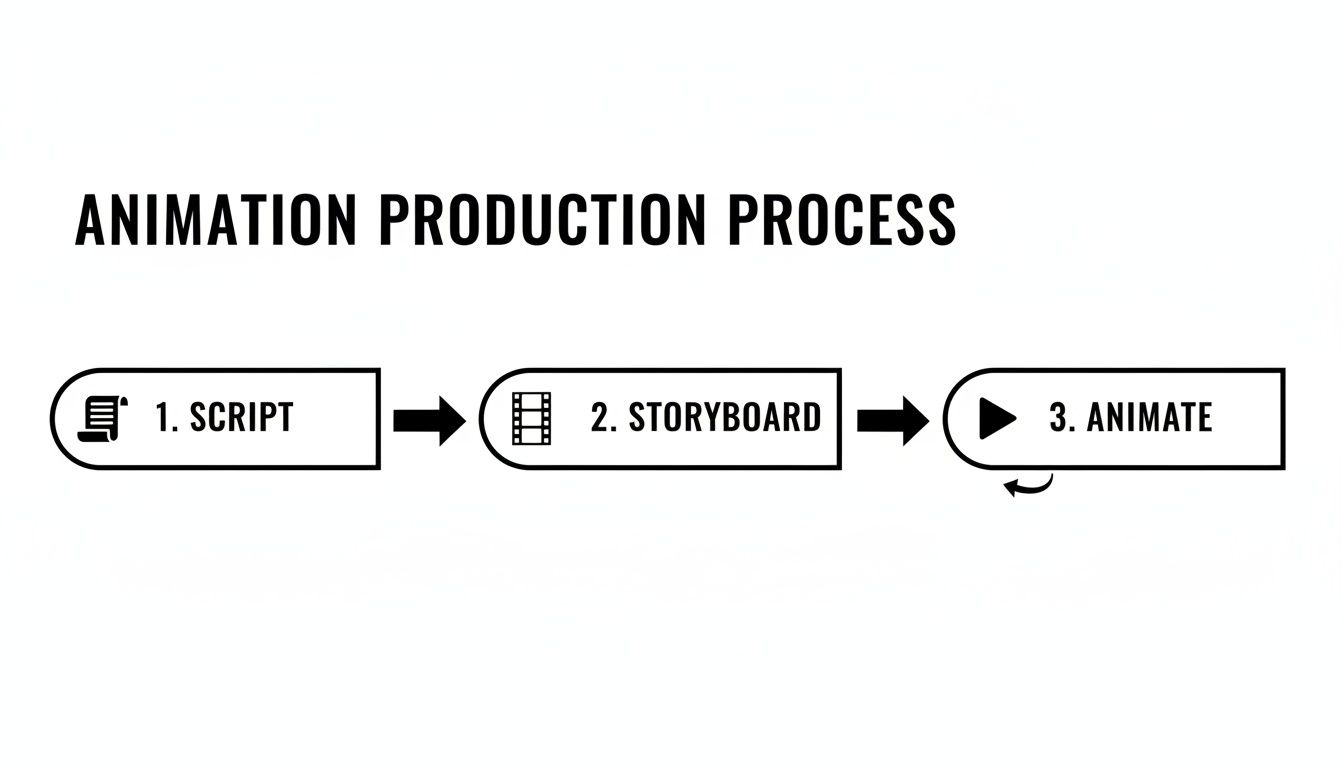
This visual shows how each creative stage builds on the one before it, ensuring a logical and efficient journey from concept to completion.
Stage 5: Sound Design and Final Delivery
The last step is adding the audio that completes the experience. This is so much more than just recording a voice-over. Professional sound design means sourcing or creating sound effects that make the on-screen action feel authentic and choosing a music track that sets just the right tone.
Once the sound and animation are perfectly synchronised, the project heads into final rendering. The finished video is exported in the exact formats you need for your learning management system (LMS), website, or internal platforms. These final touches are handled by a professional postproduction studio to guarantee the highest quality output. It’s this multi-layered process that ensures your training animation isn’t just nice to look at, but is a powerful and polished educational tool.
Best Practices for Creating Effective Animated Learning
Creating a training animation is one thing, but making one that actually teaches is a completely different ball game. It’s a common mistake to think that just putting some visuals in motion will automatically lead to effective learning. To see a real return on your investment, the animation must be built from the ground up with solid instructional design principles that respect how the human brain actually processes and holds onto information.
This means we have to go beyond just making a slick explainer video and instead craft a purposeful learning experience. The ultimate goal is to make your content not just engaging, but truly memorable and actionable. By sticking to a few core practices, you can turn a simple video into a powerful educational tool that drives real performance improvements and makes sure your message sticks long after the credits roll.
Focus on One Core Idea Per Scene
One of the quickest ways to derail a training animation is to cram too much information into a single scene. This triggers what’s known as cognitive overload, a state where a learner’s brain gets so overwhelmed with data that it simply can’t process or store any of it. The result? Confusion, not comprehension.
A far better strategy is to break your topic down into its smallest, most essential parts and give each one its own dedicated scene or short sequence.
- Introduce one concept clearly before you even think about moving on.
- Use visual cues to signal a shift to a new idea.
- Keep scenes short and punchy, ideally under 15-20 seconds for a single point.
Think of it like building with LEGOs. You carefully add one brick at a time to create a solid, stable structure. Tipping the whole box of bricks onto the model just makes a mess.
Harness the Power of Storytelling
Facts and figures are notoriously easy to forget, but a good story? That sticks with you. As humans, we are fundamentally wired to connect with narratives. A well-told story provides much-needed context, forges an emotional connection, and makes abstract rules or complex procedures feel tangible and relevant.
Instead of just listing safety regulations on a slide, tell a short story about an employee who makes the right choices and avoids a potential hazard. This narrative frame makes the “why” behind the rules crystal clear and far more memorable than a simple checklist.
This is an incredibly powerful technique for any training animation, as it anchors the learning objectives to relatable human experiences. This knack for visual storytelling is what separates a good creative team from a great one.
Prioritise Audio and Pacing
The visuals are only half the battle. High-quality audio is absolutely non-negotiable if you want to create an effective learning tool. A clear, professional voice-over does more than just narrate; it guides the viewer’s attention and adds a layer of authority and polish to the entire production.
Just as critical is the animation’s pacing. You have to give viewers enough breathing room to absorb what they’re seeing and hearing.
- Use Strategic Pauses: A brief pause after introducing a key term or a tricky concept gives the brain a crucial moment to process.
- Align Visuals with Narration: Make sure what’s happening on-screen is in perfect sync with the voice-over to reinforce the message, not distract from it.
- Reinforce with On-Screen Text: Use keywords or short phrases on screen to highlight the most critical takeaways.
This attention to detail in production is what elevates the final piece. To really get the most out of your training animations, it’s best to weave them into a broader, more thoughtful approach to designing effective learning experiences. This approach is backed by a strong educational foundation, which is precisely why training and education form the backbone of Poland’s animation industry. World-class schools are producing top-tier talent that powers studios like Simple Frame, fuelling a sector that’s seeing a 4.44% CAGR growth, projected to hit 3,564.86 USD Billion by 2032.
Of course, here is the rewritten section with a more natural, human-like tone, following the provided style guide.
Common Questions About Training Animation
When you’re first looking into training animation, it’s completely normal to have some practical questions. What’s the budget going to look like? How long will it take to create? Getting these answers sorted out early on clarifies the whole journey, from that first spark of an idea to the finished video, and makes sure everyone is on the same page.
Let’s tackle the questions we hear most often.
How Much Does a Training Animation Cost?
There’s no single price for a training animation. Think of it like ordering a custom piece of furniture – the final cost really depends on how complex the design is, the materials used, and the overall size. The same logic applies here.
A few key things influence the budget:
- Animation Style: A detailed 3D animation showing the inner workings of a complex machine is naturally going to require a bigger budget than a simple 2D character explainer.
- Length: A longer video simply means more time spent on every single stage of production, from writing the script and drawing storyboards to the final animation and sound mixing.
- Complexity: A scene filled with multiple characters, rich backgrounds, and special visual effects is a lot more involved than a clean, minimalist motion graphics piece.
Honestly, the best way to start is by nailing down your learning objectives first. When you know exactly what you need to teach, a production studio can suggest the most effective and budget-friendly style to get you there.
How Long Does the Production Process Take?
For a typical training animation, let’s say around 60-90 seconds long, you can expect the process to take anywhere from four to eight weeks from start to finish. This timeframe allows for a proper, collaborative process without rushing any of the important creative stages. If the project is more complex, like a highly detailed 3D technical animation, it might stretch to twelve weeks or even longer.
A good production timeline isn’t just about getting it done fast. It’s about building in dedicated moments for feedback and tweaks, especially after the script and storyboard stages. This collaboration is what guarantees the final animation is perfectly aligned with what you had in mind.
Trying to rush the process almost always means cutting corners on quality. A realistic timeline respects the creative work involved and results in a polished, effective learning tool that your organisation can be proud of.
How Can We Measure the ROI?
Measuring the return on investment (ROI) for a training animation is absolutely doable, you just need to track the right things. The goal is to see real, tangible improvements in how people perform and how efficiently they work after the training goes live.
Here are a few key metrics to watch:
- Reduced Training Time: How long does it take to get a new employee up to speed using animation compared to your old methods?
- Improved Compliance Rates: Are more people following the new safety rules or company procedures? Track the numbers.
- Lower Error Rates: Are you seeing a drop in costly mistakes on the job, especially for technical tasks?
By focusing on these concrete results, you can build a strong case and clearly show the business value of investing in animated training.
At Simple Frame, we specialise in creating custom training animations that make complex topics clear and memorable. Let’s discuss how we can bring your training goals to life.