
Animated explainer videos to increase conversions: A Proven B2B Growth Strategy
Animated explainer videos aren't just engaging content; they are carefully crafted business tools designed to simplify complex ideas and directly increase conversions. By translating intricate product features into clear, compelling stories, these videos can guide potential customers through the buying journey far more effectively than text alone.
Why Animation Is a B2B Conversion Powerhouse
Let's look past the idea that video is just for "engagement" and focus on what really matters: measurable business results. For B2B and tech companies, animation isn't some fluffy branding exercise—it's a primary driver of sales and lead generation. This is especially true when you're fighting for attention in a crowded market where clarity is your biggest weapon.
Think about complex products like SaaS platforms, medical devices, or financial software. Trying to explain these with walls of text can be dense, packed with jargon, and just plain overwhelming for potential clients. Animation cuts right through that noise. It makes abstract concepts tangible and complicated ideas feel simple.
Bridging the Understanding Gap
At its core, an explainer video closes the gap between what your product does and what a customer understands it can do for them. That moment of immediate clarity builds trust and melts away a buyer's hesitation. When a prospect "gets it" in the first 60 seconds, they are so much more likely to take the next step.
This is where the real conversion magic happens. By showing instead of just telling, animation can:
- Demonstrate Value Instantly: Visually walk a user through a clear problem-and-solution scenario.
- Forge an Emotional Connection: Use relatable characters and storytelling to make your solution feel more human.
- Spotlight Key Benefits: Isolate and animate the most important features without any distractions.
The Numbers Behind the Narrative
The impact of animated explainer videos on conversions isn't just a theory; it's backed by solid data. In Poland, these videos have become a serious engine for business growth, particularly for tech-focused companies. For instance, landing pages featuring an explainer video can see conversion rates jump by up to 86% compared to pages without one.
This often boosts a website's overall conversion rate from 2.9% to 4.8%, delivering a huge increase in qualified leads from the exact same amount of traffic. For a deeper look at the data, you can explore more insights into Polish video marketing performance on clutch.co.
An animated video isn't an expense; it's an investment in clarity. It works 24/7 to articulate your value proposition perfectly every single time, acting as your most consistent and effective salesperson.
Ultimately, a well-made explainer video is a hard-working asset. It simplifies your message, builds trust, and paves a clear path to purchase, making it an essential part of modern marketing with video.
Building a Conversion Focused Video Strategy
Before you even think about storyboards or animation styles, a successful video campaign starts with a rock-solid game plan. Diving straight into production without a clear strategy is like building a house without a blueprint—it’s a recipe for costly mistakes and a disappointing result. An animated explainer video that truly moves the needle is a strategic asset, engineered from the ground up to hit a specific business target.
The very first step is to get brutally honest about your video's main purpose. Vague goals like "boost engagement" just don't cut it. You need a single, measurable objective that will steer every decision you make, from the script's first word to the final call-to-action (CTA).
Is the ultimate goal to get more demos booked for your sales team? Or maybe you need to slash the number of support tickets by making a complex feature crystal clear. Nailing down this one core purpose gives your video a clear job to do.
Pinpoint Your Primary Conversion Goal
Your video can't be everything to everyone at once. To really make an impact, you have to choose one primary conversion goal. Every single element of the video should be laser-focused on achieving that one objective.
Here are a few common conversion-focused goals to consider:
- Lead Generation: Convincing viewers to book a discovery call or request a demo.
- Product Sign-ups: Nudging people to register for a free trial or a freemium version of your software.
- Feature Adoption: Showing existing users how to get the most out of a new or overlooked feature to improve retention.
- Reducing Churn: Reminding customers of your unique value to stop them from jumping ship.
Picking just one goal stops your message from getting watered down. If you try to generate new leads and train existing users in the same video, you'll probably fail at both. Focus is your best friend when using animated explainer videos to increase conversions.
Understand Who You Are Talking To
With your goal locked in, you need to know exactly who you're speaking to. This is about more than just surface-level demographics. You need to get inside the head of your ideal customer, understanding their frustrations, their ambitions, and what makes them tick. To make sure your video truly connects, it's essential to first create buyer personas that feel like real people.
A well-defined persona helps you answer the crucial questions that will shape your video's entire story:
- What is their biggest pain point? What problem keeps them up at night that your solution solves?
- What are their primary objections? What doubts or hesitations might stop them from taking action?
- What does success look like for them? How will your product or service make their life or work better?
Knowing these details lets you craft a narrative that speaks their language. Instead of just listing features, you can frame your solution as the answer to a problem they face every single day. This empathetic approach is always more compelling.
A great explainer video doesn't just show what your product does; it shows a potential customer a better version of themselves, made possible by your solution. It sells the outcome, not just the tool.
This deep audience insight will guide every creative choice. If you're talking to a technical crowd, you might use more specific language and data. For a busy executive, you'd focus on the big-picture benefits and ROI.
Map the Video's Role in Your Funnel
Your animated video doesn't exist in a vacuum; it’s a key stop on a much longer customer journey. To get the best results, you have to strategically place it within your sales and marketing funnel. Think about it: where will your audience see this video, and what's the very next step you want them to take?
Consider the whole customer experience. A video on your landing page has a very different job than one used in an email campaign for warm leads.
- Top of Funnel (Awareness): A video on your homepage or shared on social media should be short, punchy, and grab attention fast. The goal is to quickly explain what you do and why it matters to someone who has never heard of you.
- Middle of Funnel (Consideration): A video on a specific product page or in an email can go into a bit more detail. It’s for people who know who you are and are now weighing their options.
- Bottom of Funnel (Decision): A personalised video sent from a sales rep can be the final nudge needed to close a deal. Here, the goal is direct conversion, addressing specific concerns.
By mapping this journey, you make sure the video's message and CTA are perfectly timed with the viewer's mindset. This turns your video from a standalone piece of content into a powerful conversion tool that’s fully woven into your growth strategy. For a deeper dive on using visuals to guide customers, take a look at our guide to marketing visualization.
Scripting and Storyboarding for Maximum Impact
An incredible animation style might catch someone's eye, but it's the story that actually drives conversions. Your script is the heart and soul of the video; it's the foundation that every single visual element is built upon. If you get this part wrong, even the most beautiful animation will fall flat, failing to convince your audience to take that next step.
The most effective scripts for animated explainer videos to increase conversions almost always follow a classic, time-tested structure. It’s a simple narrative that works because it mirrors how we naturally think about and solve problems.
The Problem-Solution-Benefit Formula
This isn't just a creative guideline; it's a conversion machine. The framework works by first building a sense of shared understanding and then presenting your product as the clear, compelling answer. You’re not just selling; you’re making your viewer the hero of their own story.
- Introduce the Problem: Kick things off by hitting on a specific pain point your target audience deals with every day. Use their language to show you genuinely get their struggle. This immediate connection is vital—after all, viewers retain 95% of a message from video compared to just 10% from text, and that retention begins with an emotional hook.
- Present Your Solution: Once the problem feels real and acknowledged, introduce your product or service as the obvious fix. This is where you explain what you do, but be careful not to drown the audience in technical jargon. The goal here is pure clarity, not a laundry list of features.
- Showcase the Benefit: Finally, and most importantly, paint a picture of the positive outcome. Don’t just list what your product does; show how it makes the customer’s life better. Zero in on that "after" state: less stress, more time, greater success.
This structure ensures your message isn't just understood, but felt. When people see their own challenges reflected on screen, they are far more likely to trust the solution you're offering.
From Words to Visuals: The Storyboarding Process
A script gives you the story, but a storyboard translates that story into a visual blueprint. This is a critical step that ensures your message and the animation are perfectly in sync. It’s basically a series of simple sketches, frame by frame, that maps out key scenes, character movements, and on-screen text.
Think of it as the comic book version of your video. This simple step can save an enormous amount of time and money by helping you spot potential problems before the animation work even starts. Making a change to a quick sketch is easy; re-animating a finished scene is a painful and expensive process.
This example from Wix shows a basic storyboard layout, illustrating how actions and scenes are planned out visually.
Each panel helps the entire creative team get on the same page about the visual direction, making sure the final animation brings the script to life exactly as intended.
A great storyboard does more than just plan shots; it forces you to think visually. It bridges the gap between what you want to say and what your audience needs to see to believe it.
This planning phase is your chance to play with different visual ideas and make sure the pacing feels just right. For startups trying to make a strong first impression, a well-thought-out storyboard isn't just a good idea—it's non-negotiable. You can learn more about how professionals handle this stage by exploring custom explainer video animation services for startups.
Your Conversion-Ready Script Checklist
Before you call the script final, run it past this quick checklist. If you can answer "yes" to each of these, you’re on the right track to creating a video that doesn't just entertain, but actively converts.
- Is the first 10 seconds captivating? You have a tiny window to grab attention. Does your opening immediately hit on a relatable problem or drop a surprising fact?
- Is the language conversational? Read your script out loud. Does it sound like a real person talking, or more like a corporate brochure? Ditch the jargon and speak your customer's language.
- Is the focus on the user's success? Your product is the tool, but the customer is the hero. Is the story framed around their victory?
- Is there a single, clear call-to-action (CTA)? Don't confuse people with multiple requests. Tell them the one thing you want them to do next, whether it's "Book a Demo" or "Start Your Free Trial."
Navigating the Production Process From Concept to Final Cut
So, you’ve got a killer script. What happens next? Moving from that finalised script to a finished, polished animated video can feel a bit like a mystery, but it’s actually a pretty structured and collaborative journey. The key is understanding the stages so you can give the right feedback at the right time. This isn’t about just handing off a script and waiting for the magic; it’s an active partnership that ensures the final video is exactly what you envisioned—and more importantly, built to convert.
The whole process usually kicks off the moment the script gets the green light. Your animation partner will dive into creating style frames and a full storyboard. This is your first real glimpse into the visual world of your video—the colour palette, the character designs, the overall vibe. Your feedback here is absolutely crucial because it sets the entire visual tone for the project.
Next up, the voiceover gets recorded. You'll typically be given a few professional voice artist options to choose from. When you listen, think about which voice best matches your brand's personality and which one will truly connect with your target audience. A warm, trustworthy voice can make all the difference in how your message lands.
The Animation and Sound Design Phases
With the voiceover locked in, the real animation work begins. This is usually the longest part of the process. It's where the illustrators and animators meticulously bring the storyboard to life, syncing every single movement with the narration. You'll get to review an early animated draft to check the pacing and flow before all the final, polished details are added.
While that’s happening, the sound design team gets to work. They're busy selecting or composing background music and adding in all those little sound effects that bring the on-screen action to life. Sound is a seriously powerful tool for stirring emotion and making a video feel dynamic and professional.
To really drive conversions, a video script needs to guide the viewer on a logical journey. This simple flowchart breaks down the core narrative structure that underpins the entire production process, moving from your audience's pain point straight to your brilliant solution.
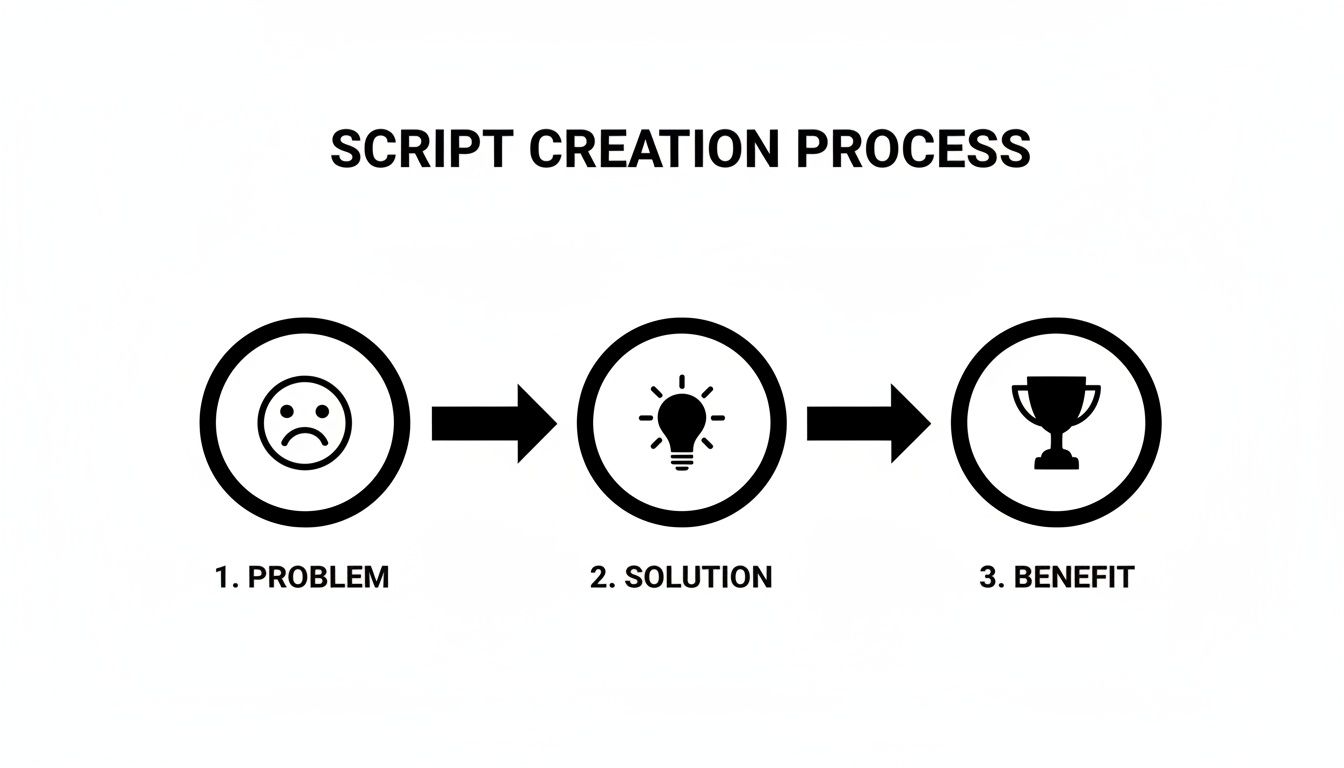
Think of this as the blueprint for the animation workflow. It’s the journey every successful explainer video takes its viewer on.
Pro Tips for a Smooth Collaboration
A great production really hinges on clear, straightforward communication. One of the best things you can do? Consolidate your team's feedback. Instead of firing off a dozen different emails from various stakeholders, gather all the comments into a single, organised document. This stops contradictory notes in their tracks and gives the production team one clear set of instructions to work from.
It’s also important to trust the experts you’ve hired. Your input on brand messaging and goals is non-negotiable, of course. But try to give the creative team the freedom to make calls on animation techniques, pacing, and visual flair. They’ve done this a thousand times and know what works visually to keep viewers glued to the screen and nudge them towards your call-to-action.
The best animated video projects are genuine partnerships. They happen when a client brings deep, specific knowledge of their audience and goals, and the studio brings the creative expertise to turn that knowledge into a powerful visual story.
Finally, get your head around the difference between 2D and 3D animation. 2D is fantastic for storytelling and explaining concepts, and it's generally easier on the budget. 3D, on the other hand, is the star when it comes to showing off physical products or complex mechanics with stunning realism and depth.
The right style really depends on your product and what you need to communicate. For a bit more help, our deep dive into creating a product explainer video can help you figure out which path is best for your goals. When the production process is dialled in, a good idea becomes a powerful asset, making animated explainer videos a key driver to increase conversions.
Deploying and Optimising Your Video for Conversions
Once your animated explainer video is finished, its job is just getting started. The real work begins when you deploy it. This is where clicks turn into customers and views translate directly into revenue. A brilliant video hidden away on a forgotten page won't move the needle; strategic placement and continuous optimisation are what truly unlock its power.
The most important home for your new video is your landing page. Its effectiveness is completely tied to the platform it's on, and a high-converting landing page is paramount. If you want to dive deeper into that topic, there are some valuable insights on improving landing page conversions that are well worth your time.
Optimising Your On-Page Video Experience
Where and how you display your video can make or break its performance. The goal is to make it impossible for visitors to miss and incredibly easy for them to press play.
-
Placement is Everything: Your video has to be "above the fold"—visible without the user having to scroll. This is prime real estate. You want it to be the first thing visitors see, grabbing their attention and explaining your value proposition right away.
-
Create a Compelling Thumbnail: Don't just use the default thumbnail. It’s rarely the best choice. You need to design a custom one with a clear, benefit-driven headline and a dynamic, intriguing visual from the video itself. Think of it as a book cover; it has to spark curiosity and beg to be clicked.
-
Choose a Conversion-Focused Player: Not all video players are created equal. Use a platform like Wistia or Vimeo that gives you detailed analytics and lets you embed lead capture forms right inside the video. This lets you gate content or ask for an email at the perfect moment.
Your landing page video isn't just content; it's a strategic conversion tool. Its placement, thumbnail, and the player it lives in should all be engineered with one goal in mind: guiding the viewer to take the next desired action.
Simply embedding the video isn't enough. You have to actively guide the user’s journey, from the first frame to the final call-to-action (CTA).
Turning Your Video into a Multi-Channel Asset
Your animated explainer isn't a one-trick pony meant only for your website. To truly maximise its ROI, you need to repurpose it across every channel where your audience spends their time. This strategy reinforces your message and creates multiple touchpoints for conversion.
Think beyond the landing page and start integrating your video into:
-
Social Media Ad Campaigns: Create short, punchy 15-30 second clips specifically for platforms like LinkedIn or Facebook. These act as powerful hooks to drive traffic back to your main conversion page. We've seen case studies from companies in Poland and across Europe where a Facebook campaign supported by an animated explainer generated leads 10 times cheaper than their previous efforts. For a Polish B2B company whose lead cost was 120 PLN, that's a drop to just 12 PLN per lead.
-
Email Signatures: This is such an easy win. Add a linked thumbnail of your video to your team’s email signatures. It's a simple, passive way to put your best marketing asset in front of every single person you communicate with.
-
Sales Presentations: Equip your sales team with the video to use in demos and follow-up emails. It provides a consistent, perfectly articulated pitch every single time, helping to warm up leads and close deals faster.
A/B Testing Your Way to Higher Conversions
Optimisation is not a one-time event. It's a continuous process of testing and refining. To turn your video into a true lead generation machine, you have to constantly experiment to see what resonates most with your audience.
Here are a few key elements you should be A/B testing right out of the gate:
- Thumbnails: Test different images, colour schemes, and headline text. Your goal is to find which one achieves the highest play rate.
- Headlines: The headline above your video is just as important as the video itself. Test a benefit-driven headline against a problem-focused one to see what grabs more attention.
- Calls-to-Action: Experiment with the CTA at the end of your video. Does "Book a Demo" outperform "Start Your Free Trial"? The only way to know for sure is to test it.
By methodically testing these variables, you can make data-driven decisions that systematically improve performance. This iterative approach is the secret to creating animated explainer videos to increase conversions for the long haul.
Common Questions About Explainer Video ROI
When you’re thinking about investing in a high-quality animated explainer video, it’s only natural to have a few questions. Business owners and marketing managers I talk to always want to cut straight to the chase: what are the costs, what outcomes can we actually measure, and what real value does a video bring to the table?
Let's dive into the most common questions. My goal is to give you the clarity you need to feel confident in your decision. We're not talking about vanity metrics here; we're talking about the numbers that connect your video directly to business growth.
What Is the Ideal Length for a Conversion-Focused Explainer Video?
For a video that’s meant to grab attention and drive action, like on a landing page, the sweet spot is between 60 and 90 seconds. This gives you just enough time to hook the viewer, outline their problem, present your product as the solution, and hit them with a clear call-to-action—all before you lose their interest.
Remember, the first 10 to 15 seconds are absolutely critical. You have to immediately connect with a pain point they recognise. If that initial connection doesn't happen, they're gone.
Longer videos certainly have their place for things like in-depth product tutorials or internal training, but a landing page video has one job: convert, and convert quickly. When your goal is generating leads, a concise, powerful message always wins.
How Can We Measure the Direct ROI of Our Video?
Measuring the return on your video investment is more direct than you might think. It really just comes down to setting up the right tracking from the very beginning.
The cleanest, most direct method is to A/B test a landing page that includes the video against a version without it. Drive an equal amount of traffic to both pages, and you’ll be able to measure the exact difference in conversion rates. This kind of test provides undeniable data on your video’s direct impact.
Beyond A/B testing, you can use analytics tools to paint a fuller picture:
- Video Platform Analytics: Tools from providers like Wistia or Vimeo offer fantastic insights. You can see the play rate (how many people clicked play), engagement (how much of the video people actually watched), and even clicks on in-video CTAs.
- Google Analytics: You can track goals and events tied directly to the video, like demo requests or form submissions. This helps you see how viewers who watch the video behave differently from those who don't.
- Qualitative Feedback: Sometimes the simplest methods are the best. Just add a "How did you hear about us?" field to your sign-up forms. You’d be surprised how often people will directly credit the video.
By combining these different methods, you get a clear, data-backed understanding of your video's financial return.
The ROI of an animated explainer video isn't just about the immediate sale. It’s also about the long-term value of a perfectly articulated message that builds trust and educates your audience 24/7.
What Does a Professional Animated Explainer Video Typically Cost?
The cost of a professional video can vary quite a bit, depending on a few key factors. The animation style is a big one (2D is generally more affordable than 3D), as are the video's length and the overall complexity of the visuals.
For a high-quality, 60-90 second 2D animated video from a reputable studio here in Poland, you should expect the investment to be somewhere in the range of 15,000 PLN to over 40,000 PLN. It’s important to understand this isn't just a fee for the animation itself; it covers the entire creative process—strategy, scriptwriting, storyboarding, professional voiceover, and sound design.
It's crucial to see this as an investment in a long-term marketing asset, not just a one-off expense. A cheap, low-quality video can actually do more harm than good by damaging your brand’s credibility. A professionally produced video, on the other hand, can deliver a positive ROI for years by boosting sales, increasing user understanding, and lowering your cost-per-lead.
Can We Repurpose One Video for Different Marketing Campaigns?
Absolutely—in fact, you absolutely should. Squeezing every last drop of value out of your video by repurposing it is one of the smartest things you can do. A single animated video can be chopped up and adapted to fuel countless marketing initiatives across different platforms.
Think of your main 60-90 second video as your "hero" asset, the one that lives on your homepage or a key landing page. From there, the sky's the limit.
- Social Media Ads: Cut some short, punchy 15-30 second clips that highlight a single, powerful benefit. These are perfect for grabbing attention on platforms like LinkedIn or Facebook and driving traffic back to your site.
- Email Campaigns: Use animated GIFs or short, silent clips from your video inside your emails to boost click-through rates. A little bit of motion stands out way more than a static image in a crowded inbox.
- Blog Posts and Content: Embed high-quality stills or short segments of your video into relevant blog posts. It’s a great way to illustrate a concept and break up long blocks of text.
- Sales Enablement: Give your sales team the video to use in presentations and follow-up emails. It ensures your company’s value proposition is always delivered perfectly, every single time.
If you plan for this kind of multi-channel use from the beginning, you dramatically increase the return on your initial production investment.
Ready to see how a custom animated explainer video can transform your conversion rates? At Simple Frame, we specialise in creating stunning, story-driven animations that simplify complex ideas and drive business growth. Learn more about our video production services and get started today!
 English
  Polish
  German